Showing posts with label effects. Show all posts

Thursday, 8 January 2009

Side-chaining in SX4


Audiotuts has a pretty clear tutorial on setting up side-chainable plugins in Cubase SX4. It takes you through setting up a few different plugins and is easy to follow.
Side-chaining is a useful technique for creating rhythmical effects in your compositions.

Tuesday, 9 December 2008

Gleetchlab


Gleetchlab is
"a stand-alone software for glitch music authoring and sound design. Gleetchlab is a modular software designed for realtime sound manipulation.
Features include convolution, granular, neural and attractors synthesis, spectral filtering, loop points manipulation, CD skip and wow & flutter simulation, vst plugins hosting, webcam controllers."

I've not had chance to download and play yet, but the features sound interesting and its free!
Might be a useful starting point for anyone interested in starting with MaxMSP to see what kinds of things can be done.

Wednesday, 29 October 2008

elastic~ external for maxmsp


elastic~ is an external that can be used to independently control time and pitch within maxmsp. It is designed to work with the standard buffer~ object, making it easy to integrate into projects.

Unfortunately you have to pay for this external (£20), but it does show that there are some money making opportunities in producing new objects for maxmsp.

edit:
There is now a free alternative to elastic~ that you can download from here

Monday, 20 October 2008

interesting sound


progsounds has posted a pretty cool sound that was created by recording the sound produced by a pan of simmering pasta sauce, pitch shifting it down and then processing it using reverb, EQ, compression and granular effects.
check it out! would make a pretty good ambience sound.

Wednesday, 15 October 2008

Creature Sounds - a tutorial


audiotuts has a short little tutorial on creating creature sounds - particularly vocalisations.
The tutorial takes you from starting with sounds created using the human voice, pitch shifting these down, applying amplitude modulation and then using some convolution techniques to combine the human sounds with some "normal" animal sounds.
The results are pretty good and with a bit of tweaking you could produce some very nice results.

Tuesday, 14 October 2008

Synth Drone


Another good sound from audio cookbook. This one was created by programming a single note in a DAW assigning that to a VSTi synth and then setting up some of the parameters to be controlled by MIDI cc in realtime.
The output of the synth was processed using compression, delay and chorus.

The result is a pretty ominous drone sound with some nice sweeping textural changes that could be used as either a piece of atmospheric sound design or the basis of an electronic music track.

synth drone sound

Creaky Wooden Floor


audio cookbook a site that aims to post one "interesting" sound file every day has posted a recording of a creaky wooden floor that has been pitched down 2 full octaves.

The results sound very cool; you can hear lots of the timbral and textural changes taking place within the sound and the whole thing sounds like some massive creaking construction as opposed to a small piece of flooring.

This technique of extreme pitch shifting to reveal the hidden intricacies of a sound can be very useful when designing original sound effects.
"To make this 4:15 minutes long recording I found a creaky spot on the wooden floors of my house, rocked back and forth in place and pointed a stereo mic at my feet. I remember doing this years ago, but thought I’d give it another go using a faster sampling rate and bit depth so the quality is not reduced as much when pitched down. Before making the recording I set the sampling rate and bit depth to 96kHz and 24 bit. I pitched it down two octaves and then normalized the results before rendering the final output.

I’ve suggested this technique on several occasions to students and sound designers to manufacture a realistic simulation of a creaking ship. It’s sounds as if I added reverb, but it’s just the natural sound of the room itself. I was not particularly careful about recording in a quiet environment. I heard a car go by outdoors at one point, but it’s not too noticeable after the down pitching."

creaky wooden floor sample

Monday, 13 October 2008

Rough Rider - free compressor plugin


Audio Damage (makers of very nice-looking and nice-sounding plugins) have made their Rough Rider compressor plugin freely available.

Its not an amazingly complicated piece of kit, but it's functional and should sound pretty good.
"Rough Rider is a modern compressor with a bit of "vintage" style bite and a uniquely warm sound. Perfect for adding compression effects to your drum buss, it also sounds great with synth bass, clean guitar, and backing vocals. Definitely not an all-purpose compressor, Rough Rider is at its best when used to add pump to rhythmic tracks. Of course, you can use it however you'd like. The Compressor Police aren't gonna come to your house and give you a citation. Slap it on a track and crank some knobs.

The front panel layout is done the same as many hardware compressors, so it will be immediately obvious how to use it. A brief overview of the controls:

Ratio: The ratio knob is logarithmic in operation. Completely anti-clockwise is 1:1, and completely clockwise is 1:1000. The 12 o'clock position is 1:10, so everything to the left of center is single digits, and everything to the right is "atom bomb squish," essentially.

Attack and Release: We left off the actual time values, so you're gonna have to use your ears, like the he-men did it in times of myth.

Meter: That honking big dial in the middle of the UI is the gain reduction meter. It basically shows how much compression is occurring.

Sensitivity: usually called "threshold" now, but we think "sensitivity" always made more sense. Turn to the right, you get more compression, essentially. Turn it all the way to the right, and you've got a distortion box, the sound of which is tuned by Ratio, Attack, and Release.

Makeup: 30 dB of gain to compensate for the attenuation caused by the compressor.

Active: From the front panel, this is simply an off/on switch, but if you automate it, strange things happen...

MIDI Learn: Like all of our products, the VST version has MIDI Learn. Download any manual from the current product line for an explanation of how this works, as it is common among all our VST products.

Rough Rider is available as a VST effect for Windows, and an AU or VST for OSX. The OSX versions are Universal Binaries, and require OSX
10.4.0 or later.
"

Dynamic FX Busses


audiotuts has a nice, short little tutorial on using side-chaining compressors across FX busses in order to automate the volumes. This has the effect of lowering the effect level whilst your audio track is playing and then raising it back up again when the dry track is silent.
This works well on vocal tracks and help to prevent your vocals getting swamped with effects.
The tutorial was produced using Logic, but the same prinicples will transfer to any DAW.

Tuesday, 30 September 2008

Guitar Processing with MaxMSP


This article over at cycling74 is a few months old now, but is a pretty good intro to using MaxMSP apps to process "real" instruments (a guitar in this case).

It starts off with an overview of the hardware required - guitar (obviously), input device, mixer/pre-amp, etc...

It then takes you through the creation of simple, stomp-box like, effects. The first one is a chorus effect which you basically create by using the existing help files (just a bit of copy and paste).
Other effects created are an "auto-stutter" which samples small snippets of an incoming audio signal and an envelope follower which is used to control the settings for a filter depending upon the level of the audio signal.

Sunday, 28 September 2008

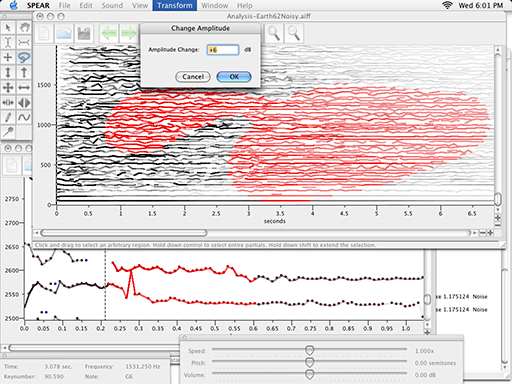
SPEAR


spear has been around for a while, but i thought i'd mention it here as its a pretty cool app that allows you to process sounds in a fairly unique way.
" SPEAR is an application for audio analysis, editing and synthesis. The analysis procedure (which is based on the traditional McAulay-Quatieri technique) attempts to represent a sound with many individual sinusoidal tracks (partials), each corresponding to a single sinusoidal wave with time varying frequency and amplitude.

Something which closely resembles the original input sound (a resynthesis) can be generated by computing and adding all of the individual time varying sinusoidal waves together. In almost all cases the resynthesis will not be exactly identical to the original sound (although it is possible to get very close).

Aside from offering a very detailed analysis of the time varying frequency content of a sound, a sinusoidal model offers a great deal of flexibility for editing and manipulation. SPEAR supports flexible selection and immediate manipulation of analysis data, cut and paste, and unlimited undo/redo. Hundreds of simultaneous partials can be synthesized in real-time and documents may contain thousands of individual partials dispersed in time. SPEAR also supports a variety of standard file formats for the import and export of analysis data."

spear is free and available for both windows and mac

Friday, 19 September 2008

free xfading / gating fx


faderratic is a free fx plugin that produces crossfades with "a mind of their own". It provides parameters for changing the fade shape, length, frequency and probability of the fades.
Its a windows only plugin unfortunately. Something to bear in mind is that it's a multi-channel input effect so if your DAW doesn't support this feature it can only be used as an autogate effect (ie xfading to silence).

Could be worth a little look if you're into your autogate effect.

Wednesday, 10 September 2008

vocal processing


audiotuts have put together a little tutorial on processing vocal recordings in order to improve their sound.
The article takes you through the use of gates, EQ, reverb, delay, de-essers, pitch correction, compression and groups.

It doesn't really tell you anything new, but its a well written and concise tutorial with good audio examples

Thursday, 4 September 2008

free plugins


The guy who created SoundHack has just announced that he's made 3 delay based effects freely available.

Soundhack is a brilliant little free app that peforms some truly amazing pitch shifting and time stretching effects on audio files.
I've not had chance to try out his new delay effects but if they're anything like soundhack they should be worth a look.
Be sure to check out his other software at his site.

Thursday, 21 August 2008

free reverb plugins


audiotuts has compiled a list of 15 reverb plugins, all of which are totally free!

There is a good mixture of both windows and mac so there should be something for everyone.
Reverb is an effect that you’ll find in any mix, and you can never have enough options when it comes to crafting the right reverberation for the sound. That’s why I’ve scoured the web to come up with this list of completely free plug-ins you can try.

Some will say you can never get the same quality reverb with a free plug-in and others will say it doesn’t really matter, but at the end of the day it comes down to your taste and what sounds good in your mix. So, download a bunch and try them out!

free dub delay effect


vst tal dub II is a free dub-style delay st effect for both windows and mac.
A 4x oversampled distortion stage allows to add vintage distortion to the delayd signal, but its also possible to make clean delays.
A sinus LFO has the possibility to modulate delay time and low pass filter cutoff. Adjustable LFO stereo width is also included.
An analog sounding 6dB low pass filter with resonance and a 3dB high cut filter are also parts of TAL-DUB-II. Different routing options open a wide range of possibilities.

* Synced delay times (1/16, 1/8, 1/4, 1/2, 1/1, 2/1 and trippled and dotted notes).
* 4x oversampled distortion stage.
* VU-Meter shows gain reduction.
* LFO (low pass cutoff and delay modulation, stereo width).
* 6dB resonance low pass filter.
* 3dB high pass filter.
* Midi learn for all pots.
* 20 factory presets.

Monday, 18 August 2008

guitar sound without an amp


audiotuts has a brief tutorial on how to create thick and crunchy sounding guitars without an amplifier.
In essence you simply use some form of amp-modelling software, some double tracking and a bit of reverb.
Fairly basic stuff really, but maybe worth a quick read for ideas.

Thursday, 14 August 2008

Sapling


sapling is
"a freeware standalone sound-mangling application for Mac OS X built with Max/MSP 5. It was designed with both live use and studio work in mind. Simply put, Sapling is a program for remixing up to four audio files, but can offer some very interesting and unexpected results by offering several realtime randomization features."


It looks like it has some nice features. The website has some audio examples of the kinds of things that it can do.
The audio output can be saved to disk for further mangling / experimentation.

Friday, 1 August 2008

free audio transients processor


Flux has released a new freeware audio transients processor.
It claims to be most effective on dynamic percussive tracks.
The controls are fairly basic; a big dial in the centre allows you to control the bitter/sweet ratio (how much the transients are reduced or increased in amplitude). You can also choose which part of the steroe field the processor goes to work on.

Wednesday, 30 July 2008

noise gate tutorial


audiotuts has a tutorial on creating a noise gate effect - the tutorial is produced using Logic, but the same principles apply to any DAW.
A noise gate effect can produce some really interesting choppy, glitchy type effects ad this tutorial takes you through the process very easily.