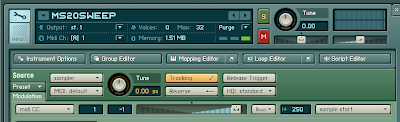
A nice little Kontakt tip from waveformless.
Use a MIDI cc (eg the mod wheel) to vary the start position of your sample as you are playing. This works best if you are using a sample which has quite a bit of variety within it, especially in terms of timbre.
"1. Find a long, resonant sweep synth sample online, or if you have a hardware synth, record your own.
2. Import the sample into Kontakt and set the root key so that it is in tune.
3. Beneath the instrument header, click the small green box marked 'Modulation' in the lower lefthand corner. This will open the modulation section for the sampler module itself. In this section, the grey drop down menu on the left represents the modulation source (ie what you use to change the sound). The slider in the middle represents the amount of modulation this source will apply when it is activated. Finally, the drop down menu on the far right represents the Modulation Destination, or what you specifically want to modulate.
4. What destinations are available is dependent on which of the sampler types (ie DFD, Sampler, Time Machine, Tone Machine) you are using. In order to do sample start modulation, you have to select the Sampler module (assuming it is defaulted to DFD).
5. In the Modulation section, select 'midi CC' as your source and change the number in the window next to it to '1'. This selects the modulation wheel as your Source.
6. Move the modulation amount slider fully to the right. You may have to adjust this, as the appropriate setting depends on the speed and length of the sweep sample.
7. Finally, select 'Sample Start' as your Modulation Destination from the drop down menu to the right."


