Showing posts with label sound design. Show all posts

Tuesday, 9 December 2008

Gleetchlab


Gleetchlab is
"a stand-alone software for glitch music authoring and sound design. Gleetchlab is a modular software designed for realtime sound manipulation.
Features include convolution, granular, neural and attractors synthesis, spectral filtering, loop points manipulation, CD skip and wow & flutter simulation, vst plugins hosting, webcam controllers."

I've not had chance to download and play yet, but the features sound interesting and its free!
Might be a useful starting point for anyone interested in starting with MaxMSP to see what kinds of things can be done.

Monday, 8 December 2008

Game Audio Explosion


I've just been reading an article posted here which is primarily aimed at game audio, but sould also be useful to people working on sound for film.
Key points:
- It is important that your audio team all understand what their role within the project is and that they all know what is expected of them. This will allow them to focus their efforts more effectively and produce higher quality work. It is fine for poeple to help out with other roles/jobs but ultimately it must be one persons role to oversee each area.
- The planning stage is extremely important. In your planning, think about the characters and locations and the style/type of sounds that would be generated/created by each.
- You can use emotional responses to certain sounds to help people to "understand" the emotional content of a scene quicker and more easily.
- It is very important to consider the frequency response of the sounds that are being created and how these will work when large numbers of sounds are combined. You don't want sounds fighting for the same space within a mix.

The article also contains a few brief tips for creating effective explosion sounds.

Friday, 5 December 2008

Ben Burtt - Talks

collider has posted 4 videos of a presentation given by Ben Burtt on the making of the sound for Wall-E.
He demonstrates the sources of some of the sounds used within the film, including the system he used in conjunction with a graphics tablet to create the voice ofthe main character.


get paid for designing sounds


kreativ sounds are offering the opportunity to get paid for designing sounds.
if you have created quality sounds that are not enough to be compiled into a big product, but they are too great to be given for free and you are also willing to sell them for as much as the buyer wants we are very interested in helping you do it through our online e-shop.

Here’s what we are looking for:

* Thematic Loops Packs with at least 25 loops in Apple, Acid, Wav or Rex format;
* Synthesizers Sound Banks with at least 32 patches / presets;
* Reason Refills with at least 64 patches / patches for Subtractor, Malström, THOR, Combinator, NNXT AND / OR NN19. Note that in case of a ReDRUM refill it must contain at least 8 drum kits.


Note 1: The more sounds a product contains the chance to sale better and for a higher price is increased.
Note 2: If your product does not fit in the above categories, please drop us a line and we’ll see what can we arrange.

Important:

* The rates are 50% - 50% from the sale price! All the PayPal and promotion fees are supported by Kreativ Sounds!
* The minimum payment accepted for a product is 1 EURO (or the currency equivalent).
* Transparency in sales is absolute! You’ll receive automatic emails when one of your products is sold with the amount of money payed so you can calculate for yourself the profit made!
* The Payments are made through PayPal between 1-7 of each month with a minimum of 50 EUR in profits. If the profit for your product(s) exceeds the 50 EUR limit before the month ends, you can request the money any time!
* The product must contain copyright free sounds, patches or loops!
* If the product contains in full or in parts sounds, patches or loops from other products you created, please specify this!
* The product is non-exclusively distributed through Kreativ Sounds websites!
* The product remains entirely yours and you can retire it (if you wish so) after 1 Year accepting the distribution contract.
* Kreativ Sounds is committed to help you promote and create graphics for the product(s) at request, free of charge.

Thursday, 27 November 2008

Dead Space - Sound Design


original sound version has a good interview with the Audio Director repsonsible for the new Dead Space game. In the interview he discusses the approach his team took when designing the audio (sound design/effects and music) for the game.

He talks about how the original idea form the outset was to use the sound design to establish the mood of the game and not to have separate music and sound design tracks. He wanted the whole thing to be combined into a single unit that they could use as a textural device to support the ingame action and drama.

One of the most interesting things discussed is the use of "fear emitters"; these are attached to objects and enemies within the game and the players proximity to and the numebr of these emitters was used to control parameters of the audio. This meant that, just like in Horror movies, the audio team could produce a soundtrack that "builds up to the boo" and heighten the sense of suspense within the game. The musical soundtrack was also controlled by these "fear emitters" which allows the audio system to mix, in real time, the 4 stereo layered streams based on the level of fear at any given moment.
The team also created sounds that have no real source and are just there to make you look behind you and to scare you!


edit:

Following on from this article music4games has a brief artcile written by EA's Audio Director Don Veca which looks at the music within Dead Space. He touches on things covered in the previous article and exaplains a few more things as well.
"Linear media allows the composer the luxury of knowing precisely what is going to happen; for example, the film dictates when and how long – exactly – a musical build-up will take. This is not the case, however, for interactive media where the video game player determines how the scene plays out.

To build a run-time system to interactively simulate this linear technique, we had to stop thinking like musicians and start thinking like programmers:

1. The music builds because things are getting scarier;
2. Things are scarier because there is more fear;
3. Fear is caused by eminent danger;
4. Certain objects in the world are (seemingly) dangerous.
5. Ergo, find a way to attach a sense of danger (fear) to various objects in the game world.

It occurred to us that our games already had the ability to emit point-source effects such as sound and light, so all we needed was a way to emit fear. This was the birth of the Dead Space Fear Emitter, which is simply a first-class game object that designers can place in the world or attach to other objects, most notably, the enemy alien creatures"

There is also a pretty good summary of the process involved in creating the music for the game.
The composer originally produced the 'traditional' type of ingame music but the game's creators wanted something that produced more of a texture and was not so obviously melodic, so in a method similar to temp tracks within the film industry the game's creators took sections fo music from horror movies and put these to the game to test their engine. The composer then took these themes and wrote new parts which were more improvisational and tetural in nature.

Monday, 17 November 2008

spring reverb


audio cookbook has posted a short sample of an experiment they conducted using just an old amplifier with a built in spring reverb.
All they did was turn up the gain and knock the amp about a little bit.

It produces some pretty cool 'industrial' sounds that could be used as sound effects in a number of different projects - but would sound good in a sound for film project.
Obviously if you're using a borrowed amp then be a little careful about how much you bang it about.

click to hear the mp3

creating a background drone sound


audiotuts has a tutorial on designing an ambient/background drone sound suitable for use in a film's soundtrack - especially if you're working on a sci-fi or horror style film.
It involves taking a constant 'musical' sound such as a flute note and then combining this with modulation based effects, pitch shifting and some convolution reverb (the key here is the source sample of your convolution, the tutorial uses a growl sound).

Worth a quick look.

Friday, 14 November 2008

Brief interview with Ben Burtt


pixar planet has a brief Q&A session with Ben Burtt, the sound designer on Wall-E.

In it he discusseshow he goes about creating voices for creatures and robots. He explains that voices are one of the hardest sounds to create as they have to be both intelligible and realistic for the creature/machine that's producing the sound. He finds that sounds that contain a human element and an electronic element work best.
He likens this to the creation of "ordinary" sounds for sci-fi films. He says that when you're trying to create the sound for a futuristic object that doesn't actually exist then it often pays to try and use a real-world sound as the basis as this will enable people to connect with the sound and make it more believable.

Monday, 20 October 2008

interesting sound


progsounds has posted a pretty cool sound that was created by recording the sound produced by a pan of simmering pasta sauce, pitch shifting it down and then processing it using reverb, EQ, compression and granular effects.
check it out! would make a pretty good ambience sound.

Friday, 17 October 2008

Interview with Matthew Wood


Matthew Wood is a supervising sound editor at Skywalker Sound.
HDFilmTools has a 3 part (currently only parts 1 & 2 are available) video interview with Matthew discussing a variety of things.

He talks about the role of supervising sound editor in realising the director's vision for the use of sound within a film and how he approaches the start of a film through spotting for effects, etc.
He also talks about how he started at Skywalker Sound when he was 17 and the roles he's had within the company since then and who he has worked with.

He briefly discusses the software that he uses on a daily basis - namely ProTools and the Waves plugins.

Part 2 ends with a discussion of his work on Wall-E and how the process of working on an animation is different to a "normal" film.

Wednesday, 15 October 2008

Creature Sounds - a tutorial


audiotuts has a short little tutorial on creating creature sounds - particularly vocalisations.
The tutorial takes you from starting with sounds created using the human voice, pitch shifting these down, applying amplitude modulation and then using some convolution techniques to combine the human sounds with some "normal" animal sounds.
The results are pretty good and with a bit of tweaking you could produce some very nice results.

Tuesday, 14 October 2008

Synth Drone


Another good sound from audio cookbook. This one was created by programming a single note in a DAW assigning that to a VSTi synth and then setting up some of the parameters to be controlled by MIDI cc in realtime.
The output of the synth was processed using compression, delay and chorus.

The result is a pretty ominous drone sound with some nice sweeping textural changes that could be used as either a piece of atmospheric sound design or the basis of an electronic music track.

synth drone sound

Creaky Wooden Floor


audio cookbook a site that aims to post one "interesting" sound file every day has posted a recording of a creaky wooden floor that has been pitched down 2 full octaves.

The results sound very cool; you can hear lots of the timbral and textural changes taking place within the sound and the whole thing sounds like some massive creaking construction as opposed to a small piece of flooring.

This technique of extreme pitch shifting to reveal the hidden intricacies of a sound can be very useful when designing original sound effects.
"To make this 4:15 minutes long recording I found a creaky spot on the wooden floors of my house, rocked back and forth in place and pointed a stereo mic at my feet. I remember doing this years ago, but thought I’d give it another go using a faster sampling rate and bit depth so the quality is not reduced as much when pitched down. Before making the recording I set the sampling rate and bit depth to 96kHz and 24 bit. I pitched it down two octaves and then normalized the results before rendering the final output.

I’ve suggested this technique on several occasions to students and sound designers to manufacture a realistic simulation of a creaking ship. It’s sounds as if I added reverb, but it’s just the natural sound of the room itself. I was not particularly careful about recording in a quiet environment. I heard a car go by outdoors at one point, but it’s not too noticeable after the down pitching."

creaky wooden floor sample

Friday, 10 October 2008

Behind the scenes of Dr Who's audio

Sonic State has an exclusive behind the scenes documentary from Bang, the post-production house in Wales responsible for the sound for the Dr Who series.
This first video is an introduction to the facility and their equipment/resources.
There is a short intro to the world of foley.


Following episdoes promise a more in depth look at sound design and foley - so should be good.

edit:
The second episode is now available. The majority of this post discusses their new Dolby licenced 5.1 studio. There are also a few comments from Russel T Davies (the main producer of ther series)

Thursday, 9 October 2008

Interview with Ben Burtt


unidentified sound object posts a video interview with Ben Burtt discussing the Wall-E film.
This is a little different from the usual interviews in that they didn't focus entirely on the cute little robot sounds. Instead Burtt discusses the advantages of working on the project from the very start and how he was able to create little sound experiments of how he thought the character might sound. He would pass these recordings to the animators who would create short sequences to using his soundtracks. The cross-collaboration between the 2 departments really helped to develop and refine the character of Wall-E.

He touches on the amount of sound effects that needed to be produced on this film (over 2,600!) due to the fact that it is an animation and so everything in the film needed to have a sound created for it.
He goes onto explain how he finds himself recording "interesting" sounds from every day life as he walks around (he calls it "collecting"), even whilst he's on holiday. He recalls taking his daughter shopping so he could get away with recording the sound of shopping trolleys crashing into things.

He finishes up reminiscing about some of his favourite characters from the films he's worked on. Obviously he mentions R2-D2 and the difficulties he had in fabricating a personality for the little robot through the use of sound. He suggests that sound designers really enjoy working on some of the minor characters in films as it allows them "invent" personalities and show off a little bit with sound.

Friday, 3 October 2008

Sound Design Competition


Post Magazine have announced a sound design competition in conjunction with "Sonopedia".
Create a 30sec piece of sound design narrative using only a set of provided samples.
Rules and Info for the SONOPEDIA Sound Design Competition

• A Sound Design Narrative can consist of a sound narrative (telling a story with sound), a sonic landscape, abstract sound art, the choice is yours.

• Judging Criteria: The judges will evaluate entries based on creative use of sound effects, and structure and flow from beginning to end.

• The Winner must be prepared to describe how they created their sound narrative, such as what kinds of effects and editing techniques they used, software used, etc.

• Audio format for entries: 16-bit 44.1 kHz stereo .wav file.

• Submit entries to submissions@postmagazine.com by November 14, 2008.

• Entries over 30 seconds long not accepted. You are only allowed to use sounds included in the download package. You are not allowed to use sounds from any other source. You are allowed and encouraged to manipulate and process the sounds.

Sunday, 28 September 2008

Sound of Gears of War


game trailers has a series of "developers diaries" focussing on Gears of War 2.
The vid that follows the above link concentrates on the sound design, effects and music of the game.

There is some good stuff for inspiration both for game sound and for film sound.

SPEAR


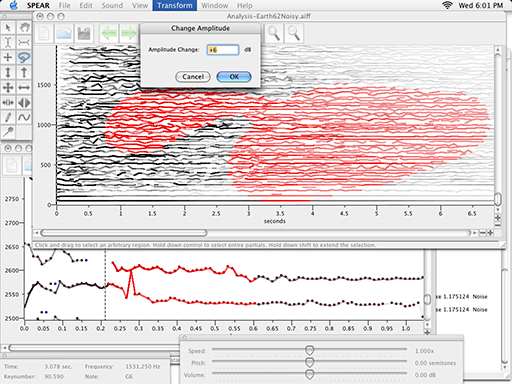
spear has been around for a while, but i thought i'd mention it here as its a pretty cool app that allows you to process sounds in a fairly unique way.
" SPEAR is an application for audio analysis, editing and synthesis. The analysis procedure (which is based on the traditional McAulay-Quatieri technique) attempts to represent a sound with many individual sinusoidal tracks (partials), each corresponding to a single sinusoidal wave with time varying frequency and amplitude.

Something which closely resembles the original input sound (a resynthesis) can be generated by computing and adding all of the individual time varying sinusoidal waves together. In almost all cases the resynthesis will not be exactly identical to the original sound (although it is possible to get very close).

Aside from offering a very detailed analysis of the time varying frequency content of a sound, a sinusoidal model offers a great deal of flexibility for editing and manipulation. SPEAR supports flexible selection and immediate manipulation of analysis data, cut and paste, and unlimited undo/redo. Hundreds of simultaneous partials can be synthesized in real-time and documents may contain thousands of individual partials dispersed in time. SPEAR also supports a variety of standard file formats for the import and export of analysis data."

spear is free and available for both windows and mac

Thursday, 11 September 2008

star wars: a new sound


just been reading this article on film sound.
It's pretty interesting.
its aimed primarily at the re-working of the original star wars soundtrack and Ben Burtt. It discusses a bit of Burtt's history and how he got started in the business and then moves onto discuss some of the processes and technical issues involved in the re-working of star wars.
The article then goes onto talk about some of the work that Burtt's contemporaries from that time have done since.

There are discussions of how certain sounds were produced and the roles of the various people involved in the creation of a soundtrack.

Monday, 8 September 2008

Kontakt: Sample Start Modulation


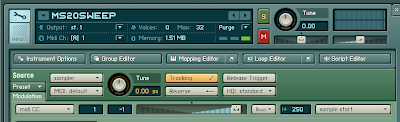
A nice little Kontakt tip from waveformless.
Use a MIDI cc (eg the mod wheel) to vary the start position of your sample as you are playing. This works best if you are using a sample which has quite a bit of variety within it, especially in terms of timbre.

"1. Find a long, resonant sweep synth sample online, or if you have a hardware synth, record your own.
2. Import the sample into Kontakt and set the root key so that it is in tune.
3. Beneath the instrument header, click the small green box marked 'Modulation' in the lower lefthand corner. This will open the modulation section for the sampler module itself. In this section, the grey drop down menu on the left represents the modulation source (ie what you use to change the sound). The slider in the middle represents the amount of modulation this source will apply when it is activated. Finally, the drop down menu on the far right represents the Modulation Destination, or what you specifically want to modulate.
4. What destinations are available is dependent on which of the sampler types (ie DFD, Sampler, Time Machine, Tone Machine) you are using. In order to do sample start modulation, you have to select the Sampler module (assuming it is defaulted to DFD).
5. In the Modulation section, select 'midi CC' as your source and change the number in the window next to it to '1'. This selects the modulation wheel as your Source.
6. Move the modulation amount slider fully to the right. You may have to adjust this, as the appropriate setting depends on the speed and length of the sweep sample.
7. Finally, select 'Sample Start' as your Modulation Destination from the drop down menu to the right."